Posts

Showing posts with the label visual basic application

Age Calculation

You can calculate age based on their birthday and today's date. 1 :- Datedif Function :-   Calculates the number of days, months, or years between two dates                             =datedif(start date, End Date, Unit) Unit:- 1. Number of completed year :- Y 2. Number of completed Month :- M 3. Number of completed Days :- D 4. The difference between the days. The months and years of the dates are ignored :- MD 5. The difference between the months. The days and years of the dates are ignored :- YM 6. The difference between the days. The years of the dates are ignored :- YD 2 :- Today Date Function :-  Returns the current date.                            =today() Age Calculation :- (C1 =  10-Mar-1980) Number of Years :-   DATEDIF(C1,TODAY(),"y") Number of Months:-DATEDI...
Filename formula

There may be times when you need to insert the name of the current workbook or worksheet in to a cell.  =CELL("filename") The problem with this is that it gives the complete path including drive letter and folders. Pick the Excel Path.  =MID(CELL("filename"),1,FIND("[",CELL("filename"))-1) Pick the Workbook name.  =MID(CELL("filename"),FIND("[",CELL("filename"))+1,FIND("]",CELL("filename"))-FIND("[",CELL("filename"))-1) Pick the Worksheet name.  =MID(CELL("filename"),FIND("]",CELL("filename"))+1,255)

Time Calculation

Image
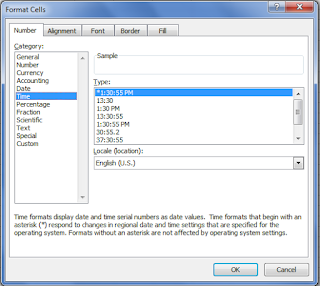
1. :- Excel can work with time very easily. 2:- Time can be entered in various different formats and calculations performed. 3:- There are one or two oddities, but nothing which should put you off working with it. Time Formats :- HH:MM:SS When time is entered into worksheet it should be entered with a colon between the Hour, Minute and Seconds. Example 1 :- 10:20:22 , 13:30:01, 23:00:00                             OR Example 2 :-  10:20 AM , 01:30 PM, 11:00 PM Excel can either the 24 hour or the am/pm system. Difference between two times End Time -  Start Time  = difference You may need to reformat the answer. Adding time End Time +  Start Time  = Answer =Sum(start Time + End Time) How To Apply Custom Formatting   1. Click on the cell which needs the format. 2. Choose the Format menu. 3. Choose Cells . 4. Click the ...

Return the characters after Nth character in a Cell

Image
Return the characters after the n th ","|"." Use of SUBSTITUTE function when you are replacing text based on its content. SUBSTITUTE find and replaces  your old text  with  new text  in a text string.  SUBSTITUTE(text, old_text, new_text, [instance_number]) The SUBSTITUTE function syntax has the following arguments Text  Required. The text or the reference to a cell containing text for which you want to substitute characters. Old text  Required. The text you want to replace. New text  Required. The text you want to replace old text with. Instance number  Optional. Specifies which occurrence of old text you want to replace with new text. If you specify instance number, only that instance of old text is replaced. Otherwise, every occurrence of old text in text is changed to new text. REPT :-  Repeats text a given number of times. Use REPT to fill a cell with...

Get_Name wise

Image
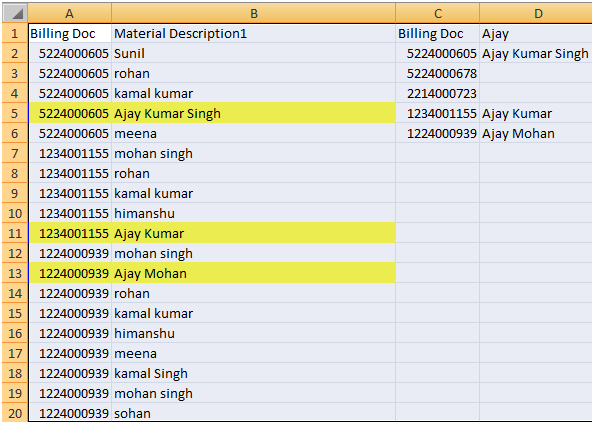
(Column C- Unique data Column A) Column D- Data Picks whose Start With AJAY   (Lookup) Sub Get_Name() Dim i As Integer Set rng1 = Sheet1.Range("g2:g6") Cri1 = Sheet1.Range("H1").Value For Each CELL In rng1 Cri2 = CELL.Value For i = 2 To Sheet1.Range("a65536").End(xlUp).Row Val1 = Left(Cells(i, 2).Value, 4) If Cells(i, 1).Value = Cri2 And Val1 = Cri1 Then Cells(CELL.Row, 8).Value = Cells(i, 2).Value Else End If Next Next End Sub

HLOOKUP function

Image
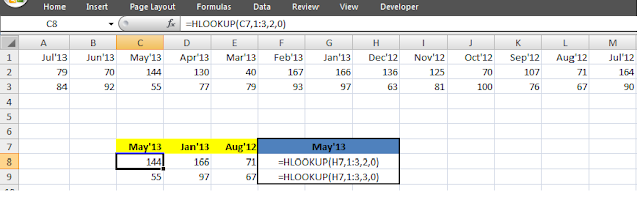
HLOOKUP function :-  HLOOKUP ( lookup_value , table_array , row_index_num ,range_lookup) 1)  Lookup_value      is the value to be found in the first row of the table. Lookup_value can be a value, a reference, or a text string. 2)  Table_array      is a table of information in which data is looked up. Use a reference to a range or a range name. 3)  Row_index_num      is the row number in table_array from which the matching value will be returned. 4)  Range_lookup      is a logical value that specifies whether you want HLOOKUP to find an exact match or an approximate match  If one is not found, the error value #N/A is returned.

The Message Box In VBA

=> One of the best functions in Visual Basic is the Message box . The message box displays a message, optional icon, and selected set of command buttons. The user responds by clicking a button. =>  The statement form of the message box returns no value (it simply displays the box ) :- MsgBox Message, Type, Title where Message      Text message to be displayed Type            Type of message box (discussed in a bit) Title             Text in title bar of message box You have no control over where the message box appears on the screen. =>  The function form of the message box returns an integer value (corresponding to the button clicked by            the user). Example of use (Response is returned value) :- Dim Response as Integer Response = MsgBox (Message, Type, Title) =>  The Type argument is formed by summing four values correspond...

Using the For/Next loop

Repeats a group of statements a specified number of times. Example-1 1) For I = 1 to 50 Step 2 A = I * 2 Debug.Print A Next I Example-2 2) For I = 50 to 1 Step -2 A = I * 2 Debug.Print A Next I In this example, the variable I initializes at 1 and, with each iteration of the For/Next loop, is incremented by 2 (Step). This looping continues until I becomes greater than or equal to its final value (50). If Step is not included, the default value is 1. Negative values of Step are allowed. ·  You may exit a For/Next loop using an Exit For statement. This will transfer program control to the statement following the Next statement.

Visual Basic Data Types

Data Type                           Suffix Boolean                                None Integer                                    % Long (Integer)                        & Single (Floating)                       ! Double (Floating)                     # Currency                                 @ Date                                   None Object                     ...

MS EXCEL INTERVIEW QUESTION

1. What are database functions e.g. what would be the difference Between SUM ( ) and DSUM ( )? 2. How are array functions useful? 3. What is the syntax for VLOOKUP ( ) / HLOOKUP ( ) function? 4. What functions can be used to lookup data on both the sides of Criteria mentioned (INDEX ( ) / OFFSET (  )) 5. Name any error handling formulas included in Excel built in 6. What is difference between Find and search? 7. What is difference between Delete and Clear Contents? 8. What is difference between Substitute and Replace? 9. What is difference between Count and CountA?

How To Use COUNTIF in Visual Basic Application

In Excel, the COUNTIF function is used to count the number of cells in a selected range that meets your requirement in the spreadsheet. The COUNTIF function is typically written in Excel as: =COUNTIF ( Range, Criteria) where "Range" = the group of cells the function is to search. However, in Visual Basic Application, the COUNTIF function is used as below: Sub COUNTIF_FIRSTTOLAST() Dim I As Integer For I = 2 To Sheet1.Range("A" & Rows.Count).End(xlUp).Row Sheet1.Cells(I, 14) = WorksheetFunction.CountIf(Sheet1.Range("M1:M" & I), Sheet1.Cells(I, 13)) Next I End Sub Order Reason Order Reason Running Repair 1 Promo Service 1 Promo Service 2 Paid Service 1 Running Repair 2 Paid Service 2 Promo Service 3 Body Repair 1 Running Repair 3 Running Repair 4